
News from our partners
Risk Exposure Management
with ADManager Plus
Risk Exposure Management
with ADManager Plus
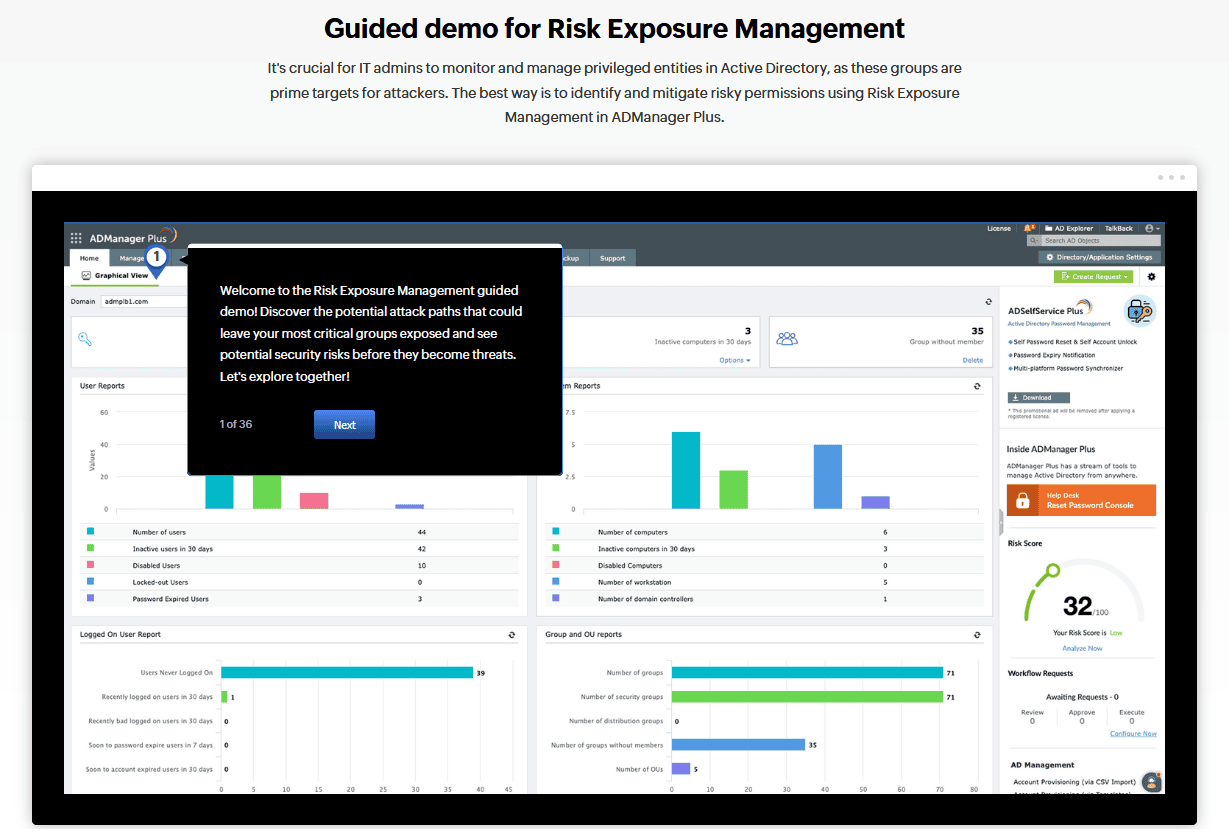
We're excited to announce a new guided demo for ManageEngine ADManager Plus, focusing on Risk Exposure Management - now available in build 8020 as part of our GRC add-on. As previously shared with partners, this feature proactively identifies and visualizes potential attack paths within Active Directory environments.
Key highlights:
Visualize potential AD attack paths and view remediation recommendations
Understand AD object relationships and their contribution to overall risk exposure
Identify privileged entities with elevated permissions (default and custom groups)
Use built-in queries to uncover security risks and attack vectors

Monthly Newsletter from ManageEngine
Monthly Newsletter from ManageEngine
Check out what's going on at ManageEngine including announcement, guides, updates and more.
Software update news
M365 Security Plus & Manager Plus
Build 4820 now available
We're pleased to share that Build 4820 is now available for M365 Security Plus and M365 Manager Plus, released on July 13, 2026. Here's what's new:
| M365 Security Plus | ||||||||||||
| ||||||||||||
| Full release notes → |
| M365 Manager Plus | ||||||||||||||||||
| ||||||||||||||||||
| Full release notes → |
SharePoint Manager Plus Build 4600
New Features and Enhancements
We’re pleased to announce the release of SharePoint Manager Plus Build 4600, introducing new management capabilities, reports, and enhancements to help administrators manage SharePoint environments more efficiently.
What’s New in Build 4600?
High Availability
Designate one or more secondary servers as standby nodes to maintain product availability during unscheduled downtime.
New Management Actions
Check In Documents– Perform bulk check-ins for selected checked-out documents.
Clear Version History – Free up site storage by deleting older file versions.
Edit Document Metadata– Update file metadata in document libraries and lists.
Versioning Settings – Manage versions, set version limits, and control draft visibility.
Break or Restore Inheritance – Manage permission inheritance at the site, document library, list, folder, or file level.
New Reports
SharePoint Server and SharePoint Online
Inactive Files– Identify files that have not been modified for a specified number of days.
Orphaned Users – Identify users associated with SharePoint sites who have been removed from Active Directory.
SharePoint Online
New reports provide greater visibility into versioning, external sharing, site activity, and storage trends:
Daily Storage Trends
Enhancements
Build 4600 also introduces several enhancements, including:
C-Store support for Audit reports in environments with large audit data volumes
AD-group-based delegation
Scheduled Check Permissions tasks for recurring permission reports
Enhanced External and Sharing reports with improved access-level visibility
Improved user and group selection in the Management module
Improved synchronization performance for Lists and List Items
CSV import support for default column metadata in Copy Site Contents
XLS export replaced with XLSX
User-specific storage unit preferences in Personalize Settings
Upgraded PostgreSQL, Apache Tomcat, and Java Runtime Environment
Log360 Cloud
Agentic & Conversational AI Capabilities
We're excited to share that Log360 Cloud is launching agentic and conversational AI capabilities this week, a major step forward in our AI roadmap.
Here's a quick overview of what's new:
Ask Zia: A conversational AI assistant built into the Log360 console. Analysts can query logs, alerts, and technician activities in plain English and get results instantly. It's accessible from anywhere in the product.
Zia Agent Studio: Customers can now deploy prebuilt agents or build custom agents to carry out specialized security tasks. Two prebuilt agents (User Activity Review and Alert Correlation) ship ready to deploy from the Zia Agent Store. Custom agents can leverage published Log360 APIs to query data and take actions across Log360, ManageEngine, and Zoho apps.
Zoho MCP Integration: Log360 now supports the Model Context Protocol, enabling external AI clients like Copilot, Claude, and Cursor to perform threat hunting and investigation directly against Log360 data. Prebuilt API tools work out of the box with no additional configuration.
Ask Zia and Zia Agents are available in the Professional edition, whereas Zoho MCP integration is available for all users.
This is a strong differentiator in customer conversations, especially with prospects evaluating AI capabilities in their SOC stack.
ADAudit Plus Build 8700
expands Entra ID reporting and cloud visibility
We are pleased to announce the release of ADAudit Plus Build 8700, introducing significant enhancements to reporting performance, cloud visibility, and audit capabilities across hybrid IT environments. The key highlights from the release are listed below:
Faster Microsoft Entra ID reporting:
Microsoft Entra ID Logon, Management, and Intune reports are now powered by ADAudit Plus' DataEngine, enabling faster search and retrieval performance.
Expanded Cloud Directory visibility:
New Microsoft 365 reports for Exchange Online, SharePoint, and OneDrive provide improved visibility into user activity and operations in the cloud.
Introduced new Cloud Directory reporting capabilities to improve detection of sign-in risks and privilege changes:
Risk Detection
Risk Resolved
Role Management
Device-Based Sign-In Activity
Enhanced Microsoft Entra ID sign-in auditing now includes additional application details such as resource name and resource ID.
Improved archive experience:
The Archive Events page now clearly indicates missing archive files with an “Archive file not found” status.
Enhanced event auditing and coverage:
Extended registry auditing with improved message formatting which now includes the registry path variable.
Expanded file and folder auditing support for Dell PowerScale / Dell Isilon 9.10.
Performance and stability improvements:
Enhancements implemented in Analytics module to improve performance and overall stability.
Compatibility Update
If Log360 integration is enabled, upgrade Log360 to Build 13025 or later to ensure compatibility with ADAudit Plus Build 8700.
We recommends upgrading to build 8700 to benefit from improved performance, expanded visibility, and enhanced operational insights.
View the full release notes for more details.
Introducing Identity Access
Now Live in US, IN, EU and AU
We’re excited to share that Identity Access, our cloud-native access management solution, is now rolling out across regions.
Identity Access helps organizations secure access across users, devices, applications, and remote access points without requiring dependency on an on-premises Active Directory environment.
Key capabilities include:
Platform-agnostic access security for diverse directory environments.
Passwordless and phishing-resistant authentication using FIDO2 passkeys and smart cards.
Protection for unmanaged, BYOD, workgroup, and non-domain-joined devices.
Conditional access based on user, device, location, role, IP, business hours, and other contextual signals.
Endpoint MFA for Windows, macOS, and Linux, including RDP, SSH, UAC, and sudo.
MFA for cloud applications, VPN, Wi-Fi, RDWeb, RADIUS, and OWA.
Offline MFA and emergency access for scenarios where network connectivity or authenticators are unavailable.
MFA frequency controls and sensitive portal action protection to periodically reverify users and require MFA before high-impact administrative actions.
Read the complete release notes here.
RecoveryManager Plus
Build 6330
A new build of ManageEngine RecoveryManager Plus is scheduled for release soon. The release will include the following updates:
Migration of Exchange Online backups from Exchange Web Services (EWS) to the Microsoft Graph API
Support for SAML-based single sign-on (SSO)
An upgrade to the bundled JRE
Security-focused upgrades to Bootstrap and jQuery 3.7.1
Minor stability and performance improvements
Please stay tuned for more information about the release.